

Betpawa is a very popular bookie among Kenyan bettors because it offers them fast deposits and payouts, allows them to bet with as low as 1 Kenyan Shilling, and boosts their winnings up to 1000%.

However, you need to log in to your account to perform various tasks on the platform, such as making deposits, placing bets, claiming bonuses, and withdrawing your winnings. Fortunately, the sign-in procedure at Betpawa is very simple, and you will log in to your account without much struggle.

Log in to Your Betpawa Kenya Account in 2026

Since the betting operator has designed different platforms through which you can access the site, you can sign into your account via any of them. But make sure to use your correct login credentials to be able to log into your account.

Method Description Link
Mobile app Runs flawlessly across Android mobile devices Download Betpawa App
Website Fully functional across desktop and handheld browsers Betpawa Website Login

Betpawa Kenya Mobile App Login

Betpawa is accessible via all types of mobile devices, thanks to its mobile and mobile site. If you have an Android-powered mobile gadget, you can get the app to make it easy to log into your account going into the future. The steps you will follow in this case are illustrated below.

1
Locate the mobile app

Press ‘Account’ at the bottom of your screen and then search for the App page in the Help section.

Locate the mobile app

2
Download the app

Make sure to allow installations from unknown sources in the settings of your mobile device and click ‘Download App’.
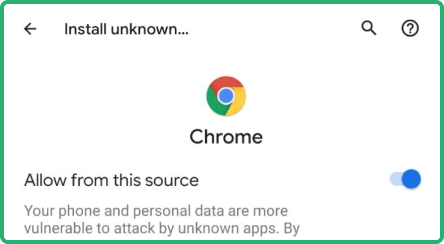
Download the app

3
Log in to your account

Launch the installed application on your device's home screen and click the Login button.

Log in to your account

4
Enter your login details and press ‘LOG IN’

Input your phone number and PIN in the provided fields and then tap ‘LOG IN’ to sign into your account.
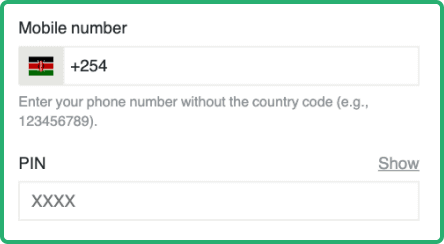
Enter your login details and press ‘LOG IN’

If you have an Apple mobile gadget, you can log into your Betpawa account via Safari browser.

Parameter System Requirements
Operating system Android 5.0 or higher
Random-access memory At least 1GB RAM recommended
Storage space required Needs a minimum of 1.85MB of storage
Internet connection The app works best with a steady internet connection

Betpawa Login via Website

This is the easiest way to sign into your Betpawa account because you don’t need to install anything, but just follow the few steps explained below.

  • Step 1: Visit the official Betpawa website. Click the link attached to this platform to be redirected to the bookmaker's website.
  • Step 2: Click ‘LOGIN’ button. This button is placed at the top right corner of the homepage, and you should click it to open the login window.
  • Step 3: Fill out the login form. Enter your phone number and a 4-digit PIN in the relevant fields in the login window.
  • Step 4: Click ‘LOG IN’. This is the last task you will perform to log in to your account. Now you can deposit and start betting.
Betpawa Login via Website

Betpawa Kenya Sign-In Issues & Solutions

Users occasionally encounter challenges when logging into their accounts at Betpawa, and that’s why it’s crucial to understand the most common issues and how to bypass them.

  • Forgotten PIN

You may forget your PIN, thereby making it impossible to log into your Betpawa account. But don’t worry, because the bookmaker will allow you to create a new one. You will just need to click “Forgot PIN?” on the login window and choose how you wish to receive a verification code that you’ll use to reset your PIN.

  • Account Lockout

Betpawa temporarily locks a player’s account after multiple failed login attempts. What you need to do to unlock your Betpawa account in case it’s locked is to wait 15 minutes and then try to sign in again.

  • Technical Issues With Account Login

You may be unable to log in to your account at Betpawa due to technical glitches, as highlighted in the table below.

Issue Possible Cause Solution
Page won’t load This problem is normally caused by poor internet connection, server overload, or cached data You should make sure your internet connection is strong and stable, clear cached data from your browser, or wait for some time before loading the website.
Login error This issues mainly arises due to incorrect login information You need to doublecheck whether you have entered the correct details in the login window.
App crashes You might be using the old version of the app You should update the application to the latest version.
Unresponsive login button This problem can be caused by website error, network connection issue, or browser problems You can troubleshoot this issue by ensuring that you have a stable internet connection, clearing browser data, or confirming with customer support whether there is a problem with the functionality of the website.

If our recommended solution to the problem you are facing doesn’t suffice, you should reach out to customer support staff either via:

Whichever channel you will decide to use, you will find a customer care agent waiting to help you.

FAQ

General Login Questions

Where can I edit my login credentials?
While you can update your PIN directly from your account, you will need to request the betting operator, via customer support, to amend your phone number.
What are my options if I can’t use my registered mobile number?
You should contact the customer support reps at Betpawa and request them to help facilitate a change of your phone number to the one you are currently using.

Account Security

Should I avoid logging in on public internet connections?
Not neccessarily. Betpawa has robust security measures in place, like data encryption, to ensure the safety of your account even when accessing it via a public wi-fi.
Should I stay logged in on my device?
No. You should avoid turning on this feature, especially if you share your device with other punters, as your account can be compromised.