Log in to Your Betpawa Kenya Account in 2026
Since the betting operator has designed different platforms through which you can access the site, you can sign into your account via any of them. But make sure to use your correct login credentials to be able to log into your account.
Betpawa Kenya Mobile App Login
Betpawa is accessible via all types of mobile devices, thanks to its mobile and mobile site. If you have an Android-powered mobile gadget, you can get the app to make it easy to log into your account going into the future. The steps you will follow in this case are illustrated below.
Press ‘Account’ at the bottom of your screen and then search for the App page in the Help section.

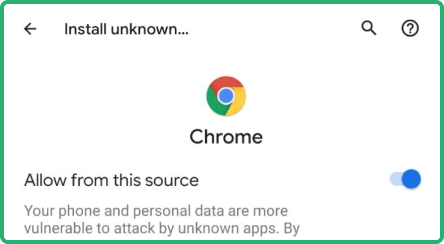
Make sure to allow installations from unknown sources in the settings of your mobile device and click ‘Download App’.

Launch the installed application on your device's home screen and click the Login button.

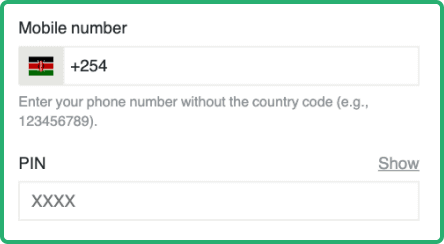
Input your phone number and PIN in the provided fields and then tap ‘LOG IN’ to sign into your account.

If you have an Apple mobile gadget, you can log into your Betpawa account via Safari browser.
| Parameter |
System Requirements |
| Operating system |
Android 5.0 or higher |
| Random-access memory |
At least 1GB RAM recommended |
| Storage space required |
Needs a minimum of 1.85MB of storage |
| Internet connection |
The app works best with a steady internet connection |
Betpawa Login via Website
This is the easiest way to sign into your Betpawa account because you don’t need to install anything, but just follow the few steps explained below.
- Step 1: Visit the official Betpawa website. Click the link attached to this platform to be redirected to the bookmaker's website.
- Step 2: Click ‘LOGIN’ button. This button is placed at the top right corner of the homepage, and you should click it to open the login window.
- Step 3: Fill out the login form. Enter your phone number and a 4-digit PIN in the relevant fields in the login window.
- Step 4: Click ‘LOG IN’. This is the last task you will perform to log in to your account. Now you can deposit and start betting.
Betpawa Kenya Sign-In Issues & Solutions
Users occasionally encounter challenges when logging into their accounts at Betpawa, and that’s why it’s crucial to understand the most common issues and how to bypass them.
You may forget your PIN, thereby making it impossible to log into your Betpawa account. But don’t worry, because the bookmaker will allow you to create a new one. You will just need to click “Forgot PIN?” on the login window and choose how you wish to receive a verification code that you’ll use to reset your PIN.
Betpawa temporarily locks a player’s account after multiple failed login attempts. What you need to do to unlock your Betpawa account in case it’s locked is to wait 15 minutes and then try to sign in again.
- Technical Issues With Account Login
You may be unable to log in to your account at Betpawa due to technical glitches, as highlighted in the table below.
| Issue |
Possible Cause |
Solution |
| Page won’t load |
This problem is normally caused by poor internet connection, server overload, or cached data |
You should make sure your internet connection is strong and stable, clear cached data from your browser, or wait for some time before loading the website. |
| Login error |
This issues mainly arises due to incorrect login information |
You need to doublecheck whether you have entered the correct details in the login window. |
| App crashes |
You might be using the old version of the app |
You should update the application to the latest version. |
| Unresponsive login button |
This problem can be caused by website error, network connection issue, or browser problems |
You can troubleshoot this issue by ensuring that you have a stable internet connection, clearing browser data, or confirming with customer support whether there is a problem with the functionality of the website. |
If our recommended solution to the problem you are facing doesn’t suffice, you should reach out to customer support staff either via:
Whichever channel you will decide to use, you will find a customer care agent waiting to help you.